Short answer: Lovable and Replit write the code, and you decide who sees the data. Own four decisions before real customers sign up. They cover what data the app collects, who can see or change it, where secrets live, and how you back it up and move it. Below: a one-page data brief, a checklist for each tool, and ten prompts to give your builder.
I have taken 15+ MVPs to production, and I coach founders who build their first apps in Lovable and Replit. This is the data checklist I want them to have before launch.
Key takeaways
- Broken access control, where one user sees or changes another user's data, ranks first in the OWASP Top 10:2025.
- In Lovable, Row Level Security (RLS) decides which rows each signed-in user can read or change. Review the policies early, before real data exists.
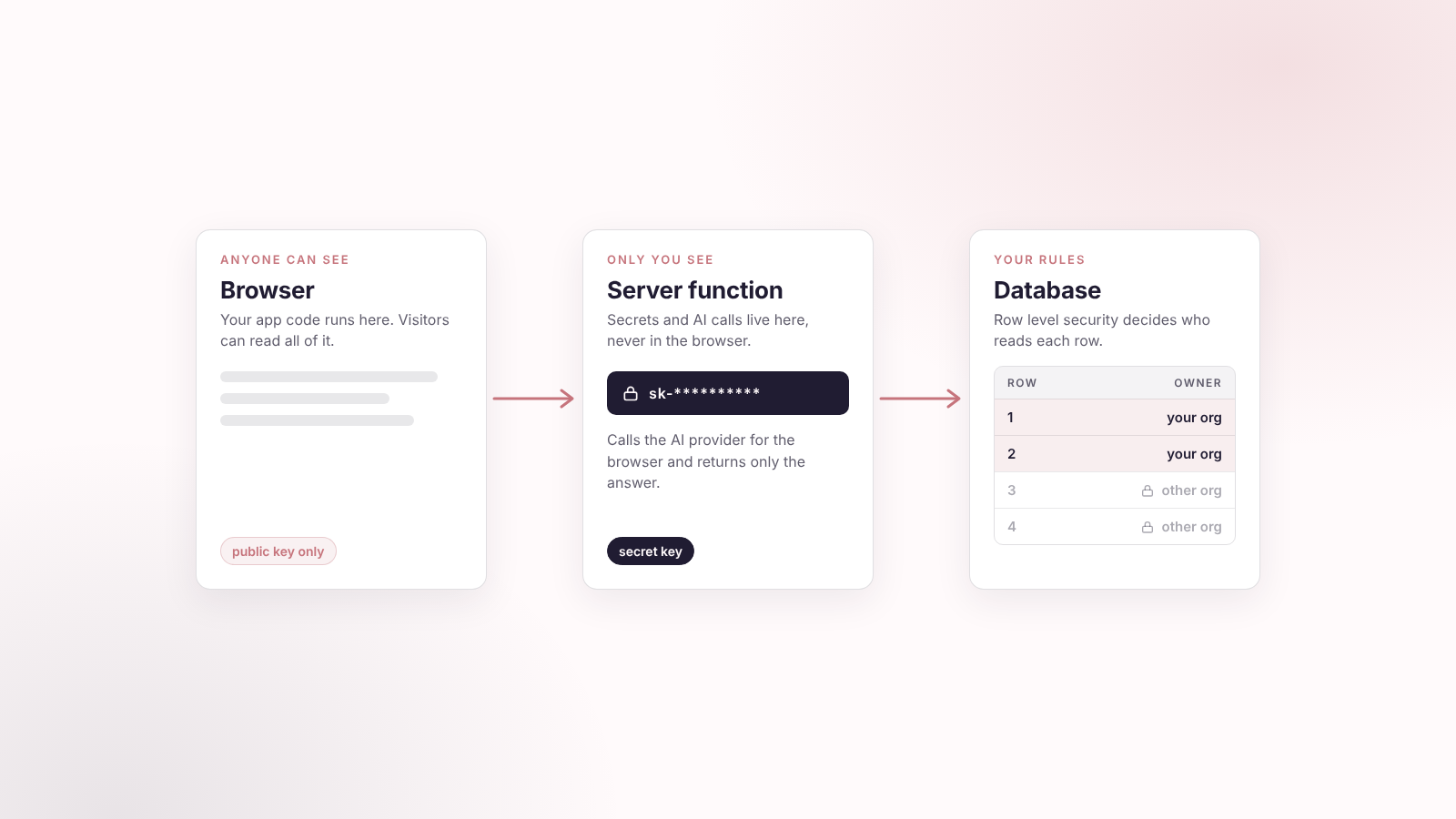
- Server code that uses the service role bypasses RLS, so that code must check permissions itself.
- In Replit, keep the development database and the production database apart, and keep credentials in Secrets.
- Back up production before big changes, and know how you would take your data with you.
The words you will meet
This article uses a handful of technical terms. Here they are in plain words. Each one comes back later with an example.
| Term | What it means |
|---|---|
| Database | The place where your app keeps its information, like a very large, organized spreadsheet file. |
| Table | One sheet in that file, for one kind of thing: customers, orders, bookings. |
| Row | One line in a table: one customer, one order. |
| Field (column) | One piece of information on a row, such as a name, an email or an owner. |
| Schema | The structure of your database: which tables exist and which fields each one has. |
| Supabase | The database service that Lovable apps usually connect to. It also handles sign-in and file storage. |
| Authentication | Checking who someone is. Signing in is authentication. |
| Access control | Deciding what a signed-in person may see or change. Also called authorization. |
| Row Level Security (RLS) | A rule set inside the database that decides, row by row, who may read, add, change or delete. Explained in full below. |
| Policy | One RLS rule, for example "a user may read only their own orders". |
| Service role | A master key for your database. Code that holds it skips every RLS rule. |
| Server-side code | Code that runs on a server you control. Browser code runs on the visitor's device, where anyone can inspect it. |
| API key | A password that lets your app use another service, such as a payment or AI provider. |
| Secret | Any value you must keep private: API keys, database passwords, tokens. |
| Environment variable | A setting your app reads at run time, outside the code. It is the safe place to keep a secret. |
| Development database | The practice copy of your database, with test data. |
| Production database | The live database that holds your real users' data. |
| Storage bucket | A folder in cloud storage for uploaded files. It is either private or public. |
| Backup (export) | A copy of your data stored somewhere else, so you can restore it. |
| OWASP | A widely used security reference for web apps. It publishes a ranked list of the biggest risks, the Top 10. |
Write the data brief before you ask for a database
If you tell Lovable or Replit to "add a database", the AI invents a data model. It will not match your business. Write one page first and paste it into your first prompt. It answers eight questions:
| Decision | The plain question | Example |
|---|---|---|
| Data | What do we collect? | Name, email, company, uploaded files, payment status |
| Sensitivity | What hurts a person or business if it leaks? | Passwords, invoices, customer contacts, internal documents |
| Ownership | Who owns each record? | A customer owns their own profile and orders |
| Sharing | Who else may see it? | A team member sees their company's projects, not another company's |
| Permissions | Who can read, create, edit and delete? | Customers edit their profile. Admins manage all records |
| Retention | How long do we keep it? | Delete inactive trial accounts after 12 months |
| Backups | Can we restore it if it disappears? | Export production weekly and before major changes |
| Outside services | Who else receives data? | Stripe, an AI provider, an email tool, analytics |
Lovable suggests building tables and policies around four access patterns: personal data, team-based access, public content with ownership, and organization-based access (Lovable docs). Pick one for each table. If you cannot say which, the AI will guess.
The risk to plan for: broken access control
The top risk in an AI-built app is a user who can see, edit or delete something that belongs to someone else. OWASP calls this broken access control and ranks it first in its 2025 Top 10. Access control means users cannot act outside their intended permissions.
Four things OWASP lists under it:
- Access given to everyone instead of specific roles or users.
- Viewing or changing another user's data by supplying their identifier.
- Create, update and delete requests with no access check.
- Acting without logging in, or getting admin rights you should not have.
The AI builder does not know which of your records are private. You do. That is why the data brief comes first.
Row Level Security explained
Row Level Security, RLS for short, is the main database safety control in a Lovable app. Take the words one at a time.
- Row. One line in a database table. In an orders table, one row is one order.
- Level. The rule works at the level of each single row, not for the whole table.
- Security. The rule decides who may read, add, change or delete that row.
A picture helps. Your orders table is one sheet with four rows. Each row has an owner. With RLS and the rule "a user may read a row only if they are its owner", each person sees a different sheet:
| Order | Owner | Anna sees it? | Ben sees it? |
|---|---|---|---|
| Order 1 | Anna | Yes | No |
| Order 2 | Anna | Yes | No |
| Order 3 | Ben | No | Yes |
| Order 4 | Ben | No | Yes |
The rule lives in the database itself, not in your app's screens. A hidden button or a filtered list in the app can be worked around. A rule in the database applies to every request your app makes, for signed-in and anonymous users alike (Lovable docs).
What a policy is
A policy is one RLS rule. You write separate policies for the four things a user can do with a row: read it, create it, edit it, delete it. A table can allow reading to all signed-in users but editing only to the owner. Each policy compares the person making the request with something stored in the row, such as an owner ID.
What RLS does not do
- A table with unchecked policies is an open table. A policy that lets everyone through is the same as having no rule.
- Code that uses the service role skips the rules, so it needs its own checks (more below).
- API keys and other secrets need a different home, covered in the Replit section.
You do not write these rules yourself. You tell your builder who owns each record and who may do what. Then you check the result.
Lovable: Row Level Security is the control to check
Lovable apps usually store data in a Supabase database. Row Level Security (RLS) is a rule in that database. It answers one question: for this user, which rows can they read, add, change or delete? Examples: "a user reads only their own orders", or "a team member sees projects in their organization". Lovable says RLS applies to requests for both signed-in and anonymous users (Lovable docs).
Lovable sets up basic policies for you. Its docs still tell you to review and adjust them early, while changes are easy and no real data exists. For each important table, you should be able to say:
- Who can read a record.
- Who can create one.
- Who can edit one.
- Who can delete one.
- Whether the rule depends on the record's owner, team, organization or a public flag.
A policy that lets everyone through is a red flag unless the table is meant to be public. You can inspect your policies under More, Database, Manage, Policies, and read the RLS findings in the project's Security view.
The service-role exception
The service role is a master key for your database. Server-side code that holds it bypasses RLS and can read or change every row. Server-side means the code runs on a server, not in the visitor's browser. The key is useful for trusted backend work, but that code must run its own permission checks. Three rules for non-technical founders:
- Never put a service-role key, database password or API key in code that runs in the browser.
- Never paste credentials into a chat prompt, a GitHub repository, a screenshot or a public document.
- Ask the AI where credentials are stored and who can reach them.
Lovable pre-launch checklist
From Lovable's own publishing checklist, plus two items I add:
- RLS is on for every sensitive table, and every new table has a policy.
- Users cannot read another user's private data. Test it with two accounts.
- Shared and public data behaves as you intended.
- No secrets sit in frontend code, and external API calls run server-side.
- Authentication is enforced server-side, and validation and critical logic run there too.
- Critical findings in the Security view are fixed.
- Internal apps have workspace visibility.
- My additions: admin access is narrow, and files with private content are not in a public storage bucket.
Replit: separate dev from production, and keep secrets in Secrets
Replit gives your app two databases. The development database is for building. It holds test data, and the Agent can create and change its tables. The production database serves the published app and holds real user data. The Agent can read it through a read replica, a read-only copy, but cannot change it, and schema changes are applied when you publish (Replit docs). Build against development data. Connect real users only when the app is ready.
Secrets
Replit's Secrets tool stores API keys, authentication tokens and database connection strings so you do not hard-code them. They are encrypted with AES-256 at rest and TLS in transit, and your app reads them as environment variables. Adding a database creates a DATABASE_URL secret for you (Replit docs). Settings that are not sensitive, such as feature flags and log levels, go in Configurations instead.
Ask the AI four questions:
- Where are the database credentials stored?
- Is any secret hard-coded in the code or committed to GitHub?
- Are development and production credentials separate?
- Does this app have only the permissions it needs?
Handle production data like production data
Replit warns that production data is your live app's real data. You turn on Enable Editing only when you mean to edit it (Replit docs). Removing a production database starts a seven-day soft-delete period. The database is switched off but not yet erased. You recover it by contacting Replit Support inside those seven days. After that it is gone.
Replit pre-launch checklist
- API keys, tokens and database URLs sit in Secrets.
- No credentials appear in code, chat history, screenshots or a public repository.
- Development and production databases are separate.
- The app checks who the user is and what they may do before it shows or changes a sensitive record.
- Only trusted server-side code talks to the database, never the browser.
- Production data is exported before a major change.
The last three are my additions. Replit's docs do not list them as a checklist.
Keep the data model simple at first
You do not need a complex architecture on day one. You need a clear data model and a clear permission model. Start with six layers:
| Layer | What it holds | Question to answer |
|---|---|---|
| Users | Accounts, roles, profile data | Who may sign in? |
| Core records | Customers, projects, orders, bookings, leads | What do we manage? |
| Ownership fields | owner_id, team_id, organization_id | Whose data is this? |
| Files | Uploads, documents, images | Private, team-only or public? |
| Audit trail | Created at, updated at, created by | Who changed what, and when? |
| Integrations | Payments, email, AI provider, analytics | Which outside services get our data? |
The fields nobody sees on screen matter most. An owner or organization ID is what lets RLS keep one user's or one company's data apart from another's.
Common mistakes to check first
- No ownership field. Users exist, but records do not belong to anyone.
- One shared table, no RLS. Every signed-in user can technically query every record.
- Public file buckets. Uploaded documents sit behind a URL anyone can guess.
- Admin as a shortcut. "Admin" becomes full access to all customer data.
- Secrets in frontend code. API keys or database credentials are visible in the browser.
- Test data in production. The live app holds fake users and demo records.
- No answer to "who gets this data?" You cannot name the outside services that receive customer information.
Backups and portability
Ask yourself one question: if we left this platform tomorrow, could we take our data with us? If the answer is a pause, fix that before launch.
Replit tells you to back up important data before removing a production database. Its Database tool includes Drizzle Studio, a visual tool for browsing tables, which can export data to a file: open Tools, then Database under Replit Cloud, select the production database, open My Data and choose Database studio (Replit docs). In Lovable, ask your builder to show you how to export every table.
A minimum routine for an early product:
- Export production before every major change to the data structure.
- Export on a schedule, such as weekly.
- Store exports outside the app platform, in encrypted cloud storage.
- Do not commit exports or credential files to GitHub.
- Restore one backup into a test project before you rely on it.
Ten prompts to give your builder
Paste these into Lovable or Replit one at a time. Read the answers. If you do not understand one, ask for it in plain words.
- Create a data model for this app. List every table, field, relationship and owner field, and say whether each table holds personal, team, organization or public data.
- For every table with user or business data, enable RLS and write separate policies for read, insert, update and delete. (Lovable)
- Make sure a signed-in user can only access records they own, or records in their own organization.
- Show me a table of every database policy: table, operation, allowed role and condition.
- Find any table without RLS, any policy that is too broad and any public storage bucket.
- Where are all API keys, database URLs and third-party credentials stored? Confirm none are hard-coded or visible in the browser.
- Keep development and production separate. Never use production data for testing. (Replit)
- Create a backup and export plan. Show me how to export production and where to store the backup.
- List every outside service that receives customer data, and what data it receives.
- Before publishing, review the app for broken access control, exposed secrets, public files, missing RLS and admin permissions.
The answers give you a first review. If the app holds payment details, health data or other regulated data, have a security professional check it before launch. Adding an AI feature next? Read how to add AI to a Lovable or Replit app.
Build it with us
Not sure your app is as safe as it looks? We run security reviews for apps built with Lovable and Replit: we check who can read and change which data, where your keys live, and what a stranger could reach, then fix the gaps with you. We can also set up the data rules from day one if you are just starting. Book a security review or see how we work in our case studies.